


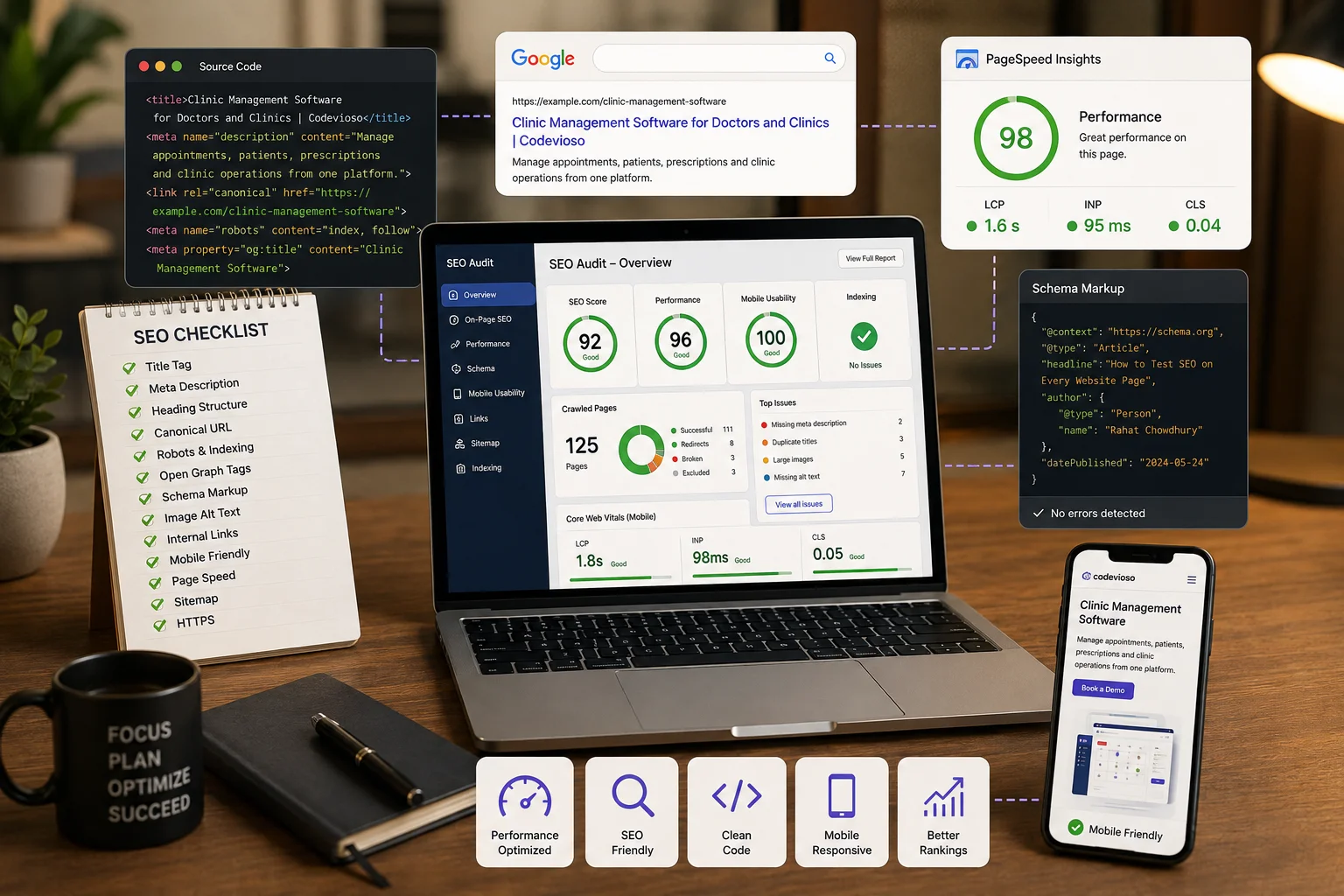
How to Test SEO Meta Information Across Every Page of a Website
Adding a title and meta description to the homepage does not make an entire website SEO-ready.
Every public page should communicate clearly with three different audiences:
- Visitors reading the page
- Search engines crawling and indexing the page
- Social platforms generating previews when the page is shared
A website can look completely correct in the browser while still having SEO problems such as duplicate titles, missing descriptions, incorrect canonical URLs, broken social-sharing images, invalid schema markup, accidental noindex rules, broken links, or poor performance.
This tutorial explains a practical process for testing SEO across every important page of a website.
What Should Be Tested?
A complete SEO audit should cover more than basic metadata.
The main areas include:
- Page titles
- Meta descriptions
- Heading structure
- Canonical URLs
- Robots directives
- Open Graph metadata
- Twitter/X cards
- Structured data
- Image SEO
- URL structure
- Internal links
- Mobile responsiveness
- Lighthouse
- Core Web Vitals
- Original page source
- HTTP status codes
- XML sitemaps
- Google Search Console
- Content quality
Instead of checking pages randomly, these elements should be tested through a repeatable workflow.
Step 1: Create a List of Every Public Page
Before checking individual SEO elements, create an inventory of every page that search engines should be able to discover.
A typical website may contain:
- Homepage
- About page
- Contact page
- Service pages
- Product pages
- Blog listing page
- Individual blog posts
- Category pages
- Portfolio pages
- Case-study pages
- Privacy policy
- Terms and conditions
Testing only the homepage is not enough.
Every page can have its own:
- Title
- Description
- Canonical URL
- Heading structure
- Social metadata
- Structured data
Group Similar Pages by Template
For larger websites, organize pages by their templates.
For example:
Homepage
About
Contact

Service Template
 ├── Web Development
 ├── Mobile Development
 └── UI/UX Design

Blog Template
 ├── Article 1
 ├── Article 2
 └── Article 3

Product Template
 ├── Product A
 └── Product B
This makes testing more efficient.
First, deeply test one representative page from each template. Then verify that other dynamically generated pages receive their own correct SEO information.
Review the XML Sitemap
The XML sitemap can help identify pages that are being presented to search engines.
It is commonly available at:
https://example.com/sitemap.xml
Check whether:
- Important pages are included
- Deleted pages are removed
- Admin pages are excluded
- Private pages are excluded
- URLs use HTTPS
- URLs open successfully
- Staging URLs are absent
- Development URLs are absent
- Preferred URLs are being used
The sitemap provides a useful starting point for the rest of the audit.
Step 2: Check the Page Title
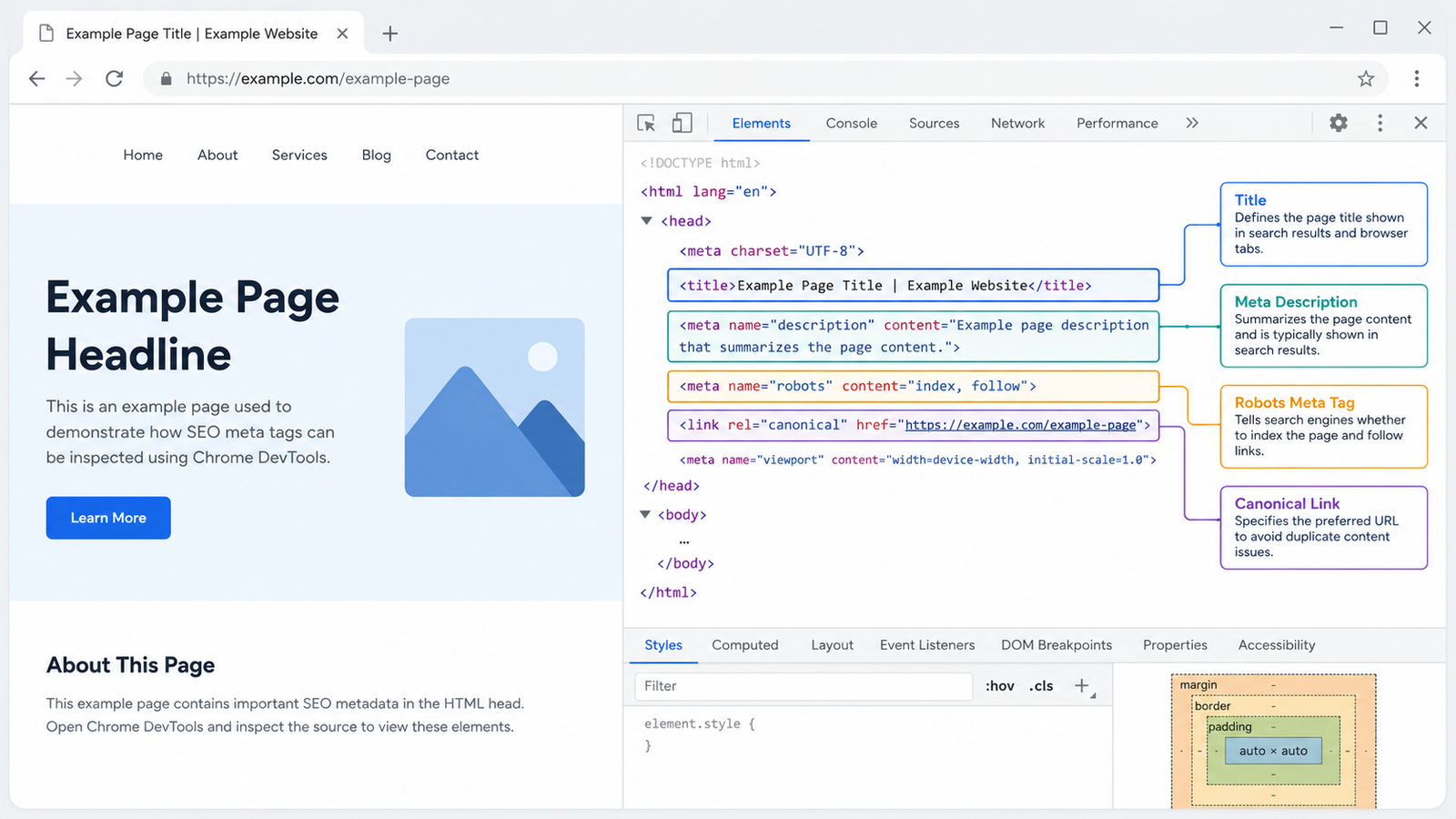
The HTML <title> element is one of the most important page-level SEO elements.
It tells search engines and users what the page is about.
Check both:
- The browser tab
- The actual
<title>element in the HTML
A good title should be:
- Present
- Relevant
- Clear
- Unique
- Related to the page topic
- Reasonably concise
- Free from unnecessary keyword repetition
Weak Example
Codevioso – Software Company
Using the same generic title across many pages makes it harder for search engines to understand the purpose of each page.
Better Product Page Example
Clinic Management Software for Doctors and Clinics | Codevioso
Better Blog Article Example
How to Test SEO on Every Website Page | Codevioso
Dynamic Pages Need Dynamic Titles
Blog posts, products, services, and case studies should generate titles using their actual content.
For example:
<title>How to Test SEO on Every Website Page | Codevioso</title>
should change when a different blog article is opened.
A hardcoded title used for every dynamic page should be avoided.
Step 3: Check the Meta Description
The meta description provides a short summary of the page.
It normally appears in HTML like this:
<meta
    name="description"
    content="Manage doctors, patients, appointments and clinic operations from one complete platform."
>
For every important page, check whether the description is:
- Present
- Relevant
- Unique
- Informative
- Naturally written
- Useful to potential visitors
- Different from other pages
- Free from keyword stuffing
Weak Description
Welcome to our website. We provide many services.
Better Description
Manage doctors, patients, appointments, prescriptions, and daily clinic operations from one complete clinic management platform.
The second version explains what the page actually offers.
Use Fallbacks for Dynamic Content
Sometimes a dynamic page may not contain a dedicated SEO description.
A practical fallback system is:
Dedicated SEO Description
        ↓
Page Excerpt
        ↓
Cleaned Main Content
        ↓
Default Website Description
This prevents empty metadata while still prioritizing page-specific information.
Step 4: Test the Heading Structure
SEO testing should also include the semantic structure of the page.
A common heading hierarchy is:
H1 → Main topic

    H2 → Major section

        H3 → Subsection

    H2 → Another major section
Check whether:
- A clear H1 exists
- The H1 describes the main topic
- The title and H1 support the same topic
- Major sections use H2
- Subsections use H3 where appropriate
- Heading levels follow a logical structure
- Headings are meaningful
- Headings are not used only for visual styling
A large font does not automatically make an element a heading.
For example:
<div class="text-4xl font-bold">
    Clinic Management Software
</div>
may look like a heading visually, but semantically it is only a <div>.
A better structure is:
<h1>Clinic Management Software</h1>
Always inspect the actual HTML structure rather than relying only on appearance.
Step 5: Verify Canonical URLs
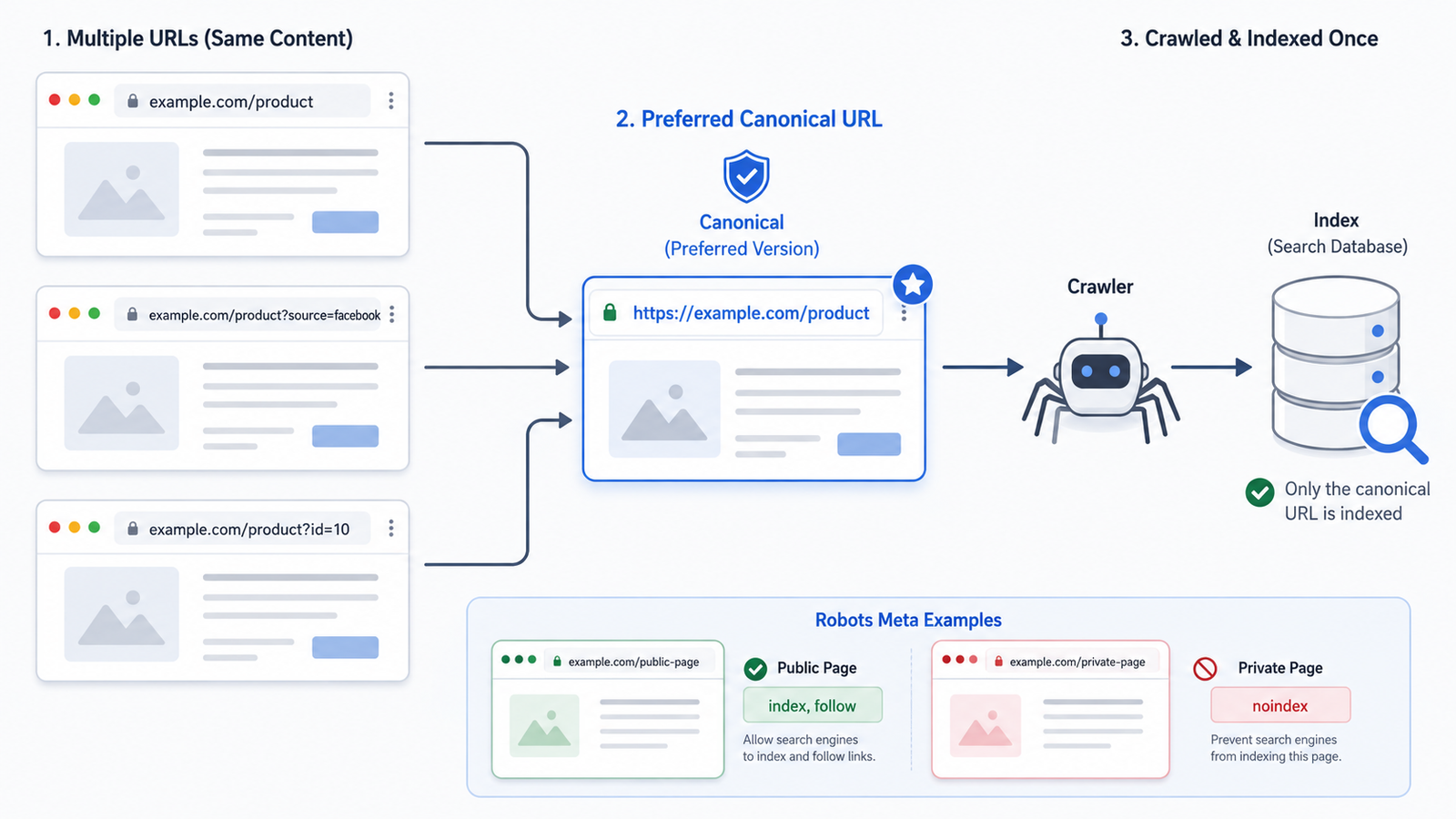
A canonical URL tells search engines which version of a page should be treated as the preferred URL.
The same content may sometimes be accessible through multiple URLs:
https://example.com/products/clinic-management

https://example.com/products/clinic-management?source=facebook

https://example.com/product?id=10
Search engines may otherwise interpret these as separate pages.
A canonical tag might look like:
<link
    rel="canonical"
    href="https://example.com/products/clinic-management"
>
For every page, check whether the canonical:
- Exists
- Uses HTTPS
- Uses the production domain
- Points to the preferred URL
- Excludes unnecessary query parameters
- Does not use staging URLs
- Does not contain localhost URLs
- Does not return a redirect
- Does not return a 404
- Does not point to another unrelated page
For most unique pages, a self-referencing canonical URL is appropriate.
Step 6: Check Indexing Permission
The next question is:
Should Google and other search engines index this page?
The robots meta tag can provide instructions.
Public Page
<meta name="robots" content="index, follow">
Private Page
<meta name="robots" content="noindex, nofollow">
Pay particular attention after deploying a website from staging to production.
An important production page accidentally containing:
<meta name="robots" content="noindex">
may not appear in search results.
Review indexing rules for:
- Homepage
- About
- Contact
- Services
- Products
- Blog articles
- Categories
- Login
- Registration
- User dashboards
- Admin pages
- Draft content
- Search result pages
Public content pages will normally be indexable.
Private dashboards, admin pages, draft pages, and similar areas generally should not be indexed.
Check robots.txt
The file is normally available at:
https://example.com/robots.txt
One particularly dangerous production configuration is:
User-agent: *
Disallow: /
This can prevent crawlers from accessing the website.
Step 7: Test Open Graph Metadata
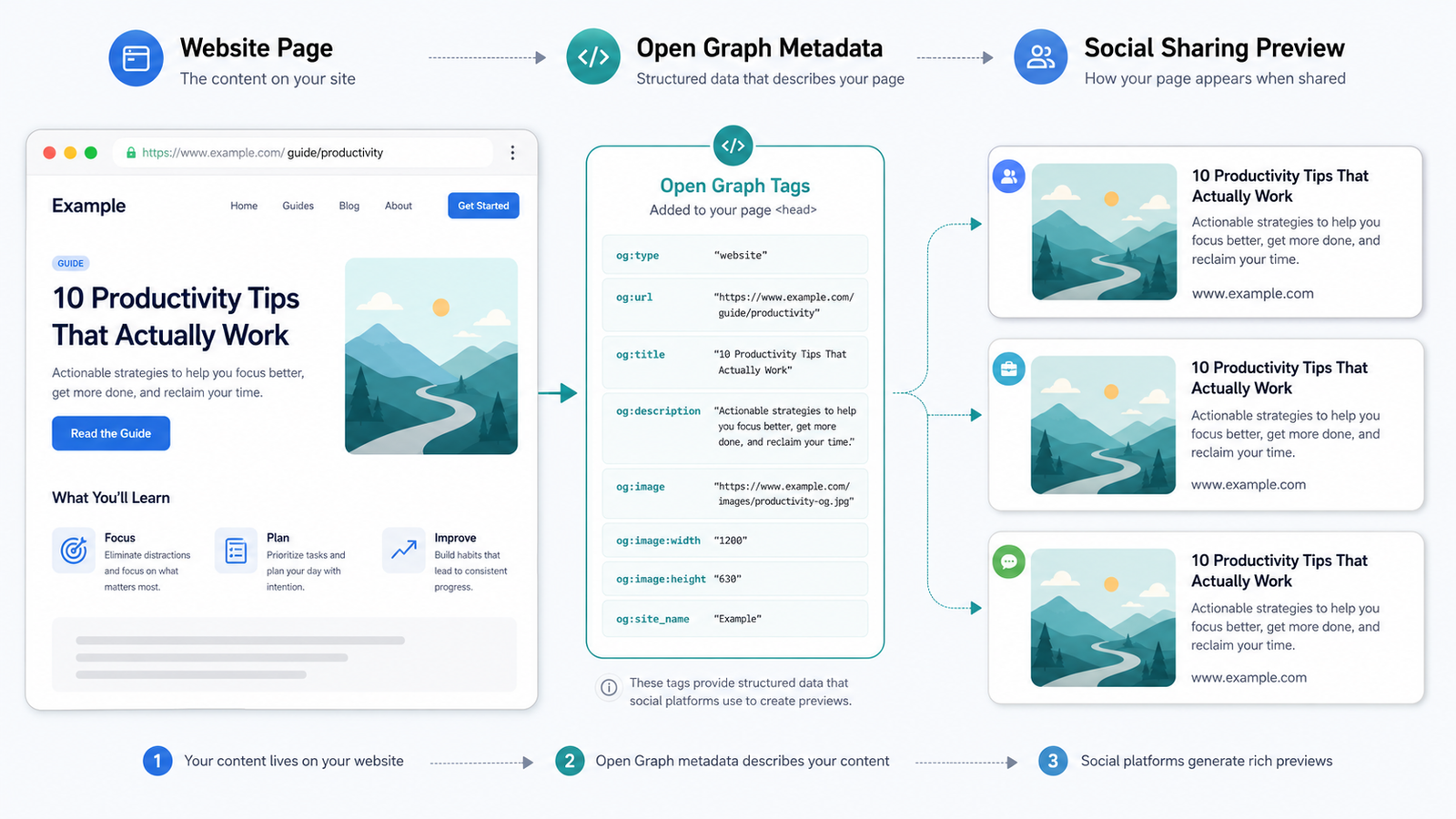
SEO information also affects how a page appears when it is shared.
Platforms may use Open Graph metadata when creating link previews.
Common Open Graph tags include:
<meta property="og:title" content="...">

<meta property="og:description" content="...">

<meta property="og:image" content="...">

<meta property="og:url" content="...">

<meta property="og:type" content="...">
Check:
- Open Graph title
- Open Graph description
- Open Graph image
- Open Graph URL
- Open Graph type
- Website or application name
Normal pages may use:
website
Blog articles may use:
article
Verify that:
- The title matches the page
- The description is relevant
- The image URL works publicly
- The image does not require authentication
- The image is not broken
- The image has an appropriate size
- The correct URL is used
- Dynamic pages have unique sharing information
A page can have perfect normal metadata and still generate an incorrect social preview.
Therefore, social preview metadata needs separate testing.
Step 8: Validate Structured Data
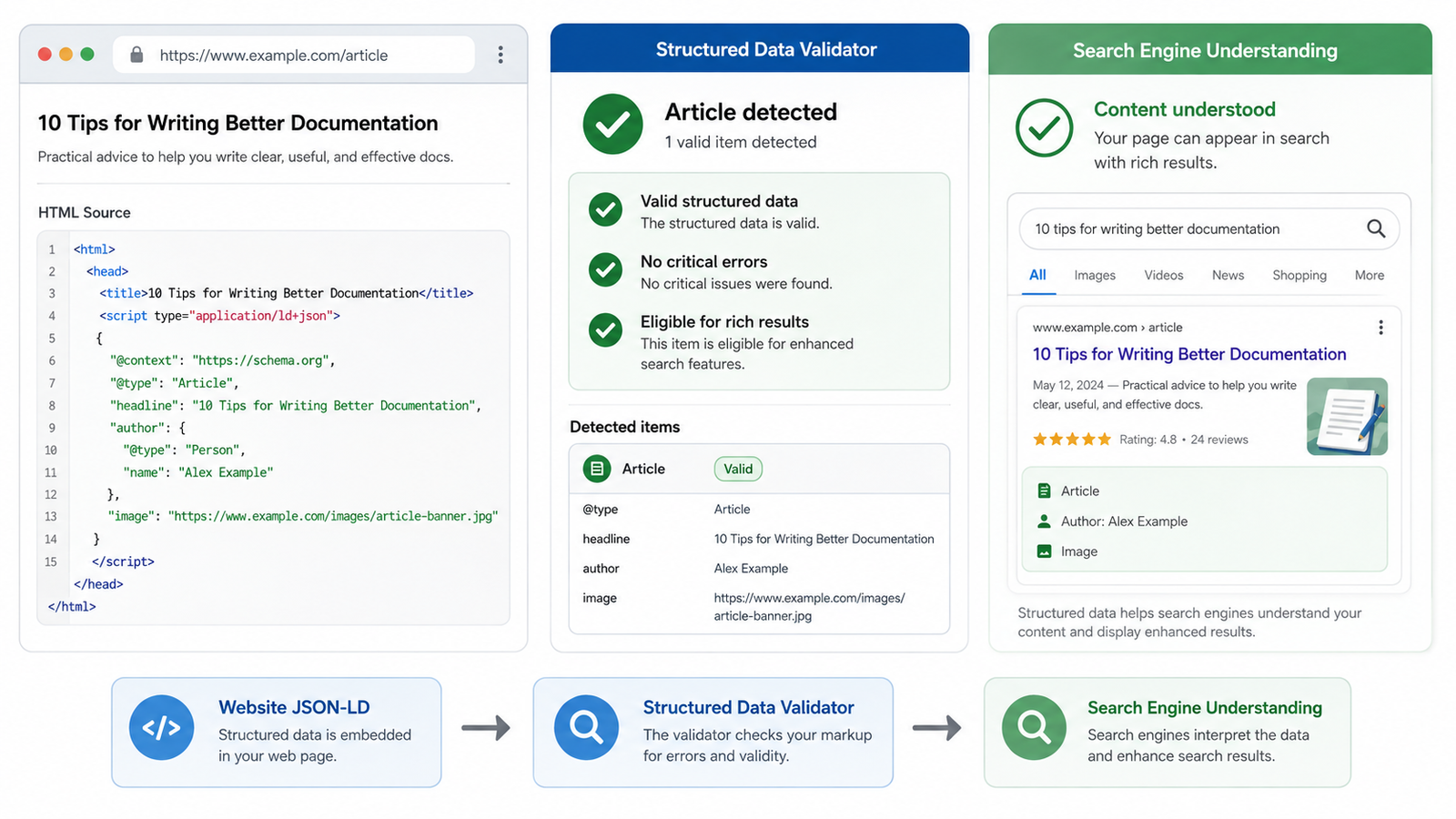
Structured data provides search engines with organized information about the content of a page.
It is commonly implemented using JSON-LD.
Possible schema types include:
OrganizationWebSiteWebPageAboutPageContactPageServiceProductArticleBlogPostingBreadcrumbListFAQPageLocalBusiness
The schema type should match the actual content.
| PagePossible Schema | |
| Homepage | Organization + WebSite |
| About | AboutPage |
| Contact | ContactPage |
| Service | Service |
| Product | Product |
| Blog article | Article / BlogPosting |
| Breadcrumb navigation | BreadcrumbList |
For example:
<script type="application/ld+json">
{
    "@context": "https://schema.org",
    "@type": "Article",
    "headline": "How to Test SEO on Every Website Page"
}
</script>
Structured data should then be validated.
Check whether:
- JSON is valid
- The correct schema type is used
- Important fields exist
- URLs are correct
- Images are accessible
- Dates use valid formats
- Author information is correct
- Publisher information is correct
- The schema matches visible content
- Errors are reported
Do not include misleading structured data.
For example, FAQ schema should represent actual FAQ content visible on the page.
Step 9: Test Image SEO
Images affect:
- Accessibility
- SEO
- Performance
- User experience
Informative images should use descriptive alternative text.
Weak Example
<img src="dashboard.jpg" alt="image">
Better Example
<img
    src="dashboard.jpg"
    alt="Clinic management dashboard displaying appointments and patient records"
>
Check whether:
- Informative images have descriptive alt text
- Decorative images are handled properly
- Alt text reflects the image
- Keywords are not unnaturally repeated
- Image URLs work
- Images are responsive
- Images are optimized
- Width and height are defined where appropriate
- Lazy loading is used where appropriate
- Large images are compressed
- Modern image formats are considered
Decorative shapes and background patterns generally do not require descriptive alt text.
Step 10: Review URL Structure
A good URL should be easy to understand.
Good
https://example.com/services/web-development
Poor
https://example.com/page.php?id=125&type=service
Check whether URLs:
- Use meaningful words
- Use lowercase letters
- Use hyphens
- Avoid unnecessary numbers
- Avoid long query strings
- Avoid spelling mistakes
- Follow a consistent pattern
- Avoid unnecessary database IDs
- Match the page topic
- Use HTTPS
Also check how the website handles:
HTTP vs HTTPS

WWW vs non-WWW

Trailing slash vs no trailing slash

Uppercase vs lowercase
One preferred URL format should be used consistently.
Step 11: Test Internal Links
Internal links help both visitors and search engines navigate the website.
Review links in:
- Header
- Footer
- Buttons
- CTAs
- Services
- Products
- Blog posts
- Categories
- Breadcrumbs
- Related articles
- Related products
- Portfolio sections
Check whether:
- The destination is correct
- The page opens successfully
- No 404 occurs
- Link text is meaningful
- Important pages receive internal links
- Old URLs are updated
- Redirect chains are avoided
A page that exists but has no internal links pointing toward it may become an orphan page.
Step 12: Check Mobile Responsiveness
Mobile usability should also be part of the SEO audit.
Chrome Developer Tools can be used to test:
- Small phones
- Large phones
- Tablets
- Laptops
- Desktop screens
Check whether:
- Text remains readable
- Horizontal overflow does not occur
- Buttons are easy to tap
- Navigation works
- Images remain responsive
- Forms remain usable
- Headings are visible
- Tables remain usable
- Popups do not hide important content
- Important information remains available
A technically correct page can still provide a poor search experience if it is difficult to use on mobile.
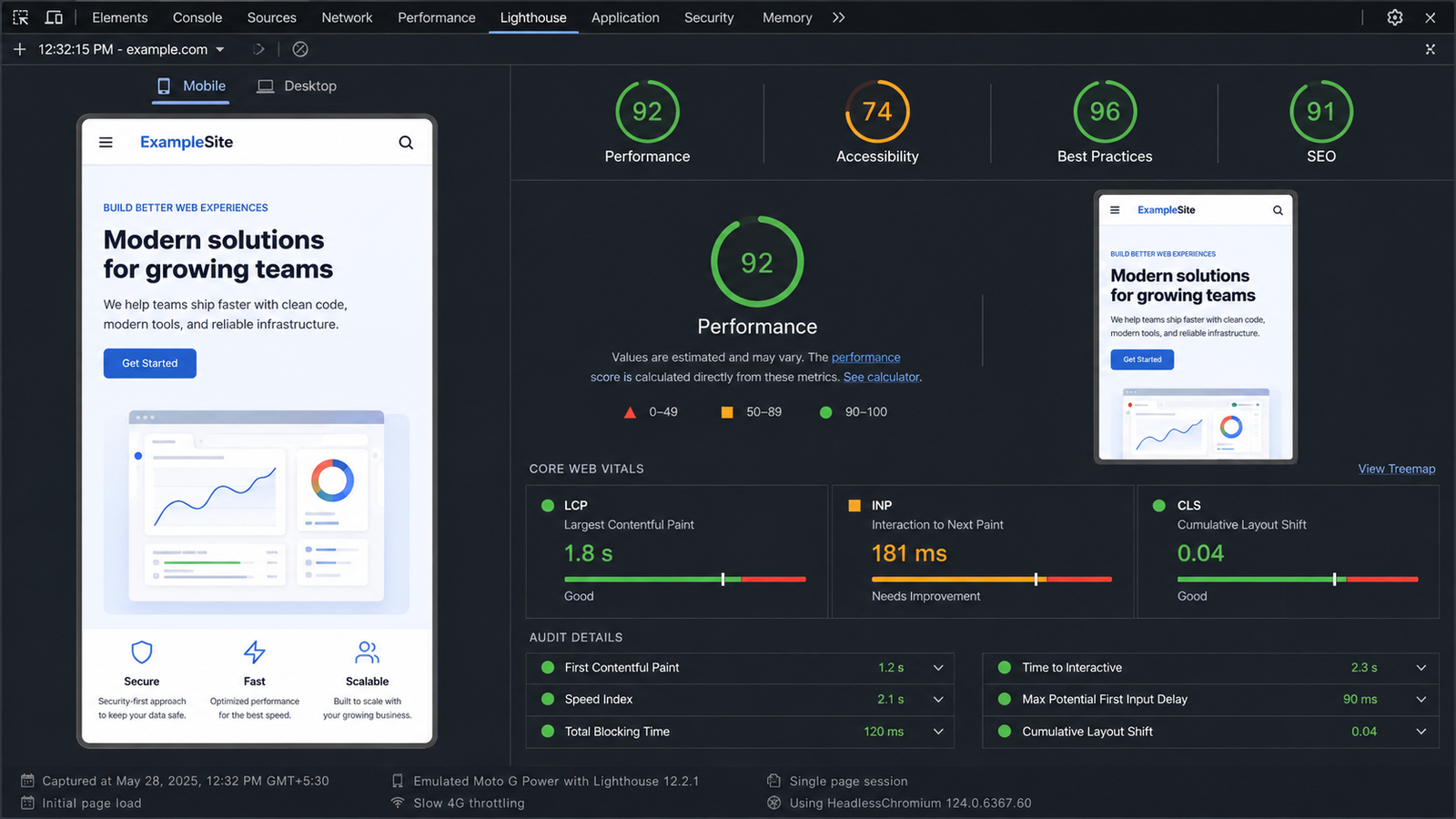
Step 13: Run a Lighthouse Audit
Chrome Lighthouse provides automated testing for common website issues.
How to Run Lighthouse
- Open the webpage in Chrome.
- Right-click.
- Select Inspect.
- Open Lighthouse.
- Select Mobile.
- Enable:
- SEO
- Performance
- Accessibility
- Best Practices
- Run the audit.
Review SEO problems related to:
- Title
- Meta description
- Crawlability
- Image alt text
- Link descriptions
- Mobile content
- HTTP status
- Document structure
Review performance issues such as:
- Large images
- Unused JavaScript
- Unused CSS
- Render-blocking resources
- Slow server response
- Layout shifts
- Heavy third-party scripts
- Long JavaScript tasks
Do not depend only on the Lighthouse score.
A webpage can receive a high SEO score and still contain problems such as incorrect canonical URLs or duplicated metadata.
Step 14: Test Core Web Vitals
Google PageSpeed Insights can be used to test important pages on mobile and desktop.
Three important Core Web Vitals are:
Largest Contentful Paint — LCP
LCP measures how quickly the primary visible content loads.
Poor LCP can result from:
- Large hero images
- Slow server response
- Render-blocking CSS
- Heavy JavaScript
- Slow font loading
- Unoptimized background images
Interaction to Next Paint — INP
INP measures how quickly the website responds after user interaction.
Problems can come from:
- Large JavaScript tasks
- Heavy components
- Too many event listeners
- Third-party scripts
- Expensive browser calculations
Cumulative Layout Shift — CLS
CLS measures unexpected movement during loading.
Common causes include:
- Images without dimensions
- Late-loading fonts
- Dynamic content insertion
- Advertisements
- Components changing size
Step 15: Compare Page Source and Rendered HTML
This step is especially important when using technologies such as:
- Vue
- React
- Next.js
- Other JavaScript frameworks
Check whether the initial HTML response contains:
- Title
- Meta description
- Canonical URL
- Robots metadata
- Open Graph metadata
- Twitter/X metadata
- Structured data
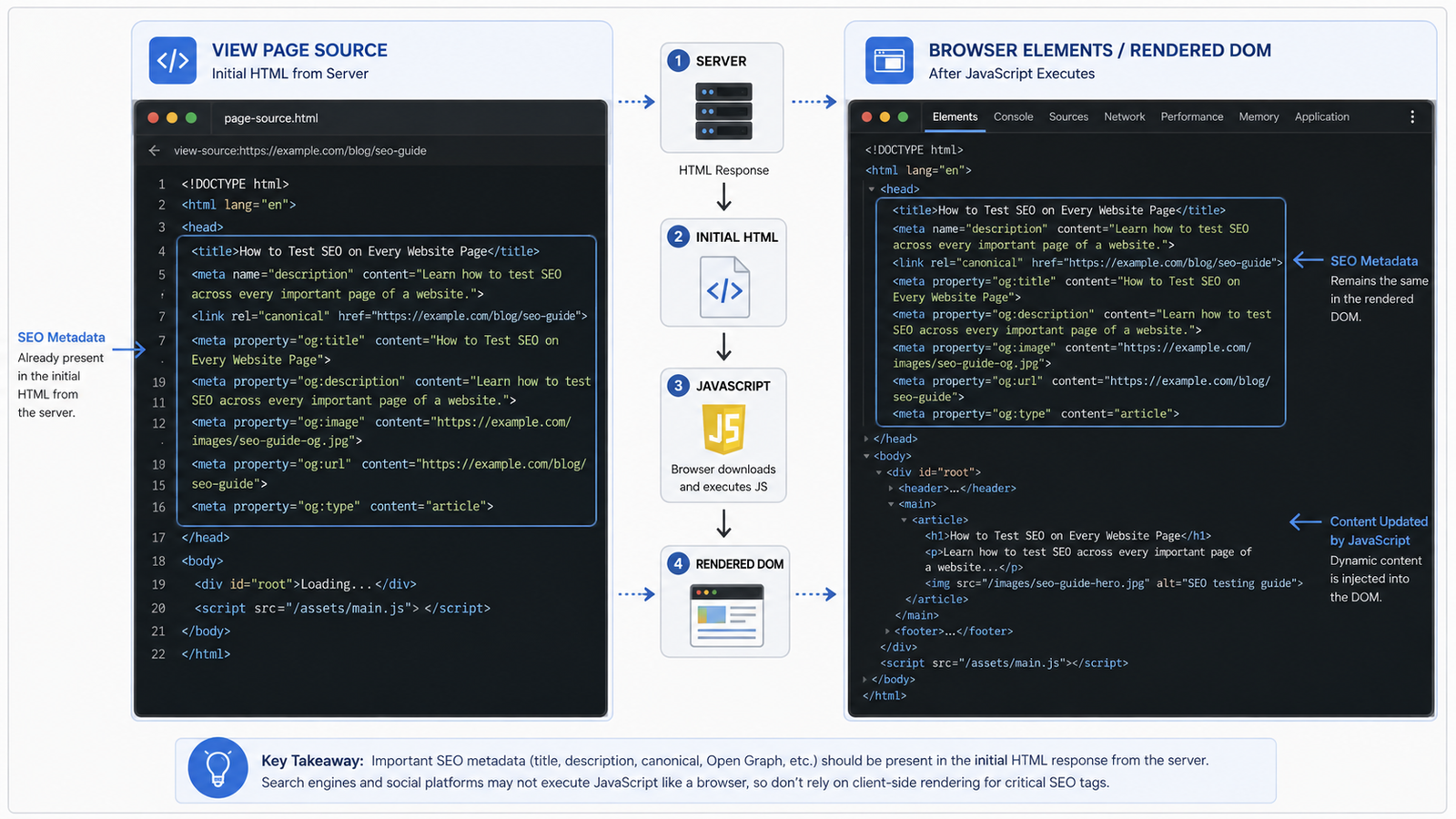
Compare two views.
View Page Source
This shows the HTML initially returned by the server.
Elements
This shows the final DOM after JavaScript has executed.
For example:
Server Response
      ↓
Initial HTML
      ↓
JavaScript Executes
      ↓
Rendered DOM
If important metadata only appears after JavaScript runs, crawlers and social platforms may not always process it as expected.
Server-rendered metadata is generally more reliable.
Step 16: Check HTTP Status Codes
Every URL should return the correct HTTP response.
Common responses include:
200 → Successful page

301 / 308 → Permanent redirect

302 / 307 → Temporary redirect

404 → Page not found

500 → Server error
Existing public pages should normally return:
200
Deleted pages should return a genuine:
404
Avoid showing a normal error page while still returning 200.
Avoid Redirect Chains
Instead of:
URL A
 ↓
URL B
 ↓
URL C
 ↓
Final URL
prefer:
URL A
 ↓
Final URL
Direct redirects reduce unnecessary requests.
Step 17: Validate the XML Sitemap
After testing individual pages, check the sitemap again.
Verify that:
- Canonical URLs are included
- URLs return successful responses
- Redirecting URLs are excluded
noindexpages are excluded- Admin pages are excluded
- Draft pages are excluded
- Development URLs are excluded
- Deleted pages are removed
- Newly published pages appear
- The production domain is used
Large websites may have multiple sitemaps:
pages-sitemap.xml

blog-sitemap.xml

products-sitemap.xml

categories-sitemap.xml

images-sitemap.xml
These can be grouped inside a sitemap index.
Step 18: Test Important URLs in Google Search Console
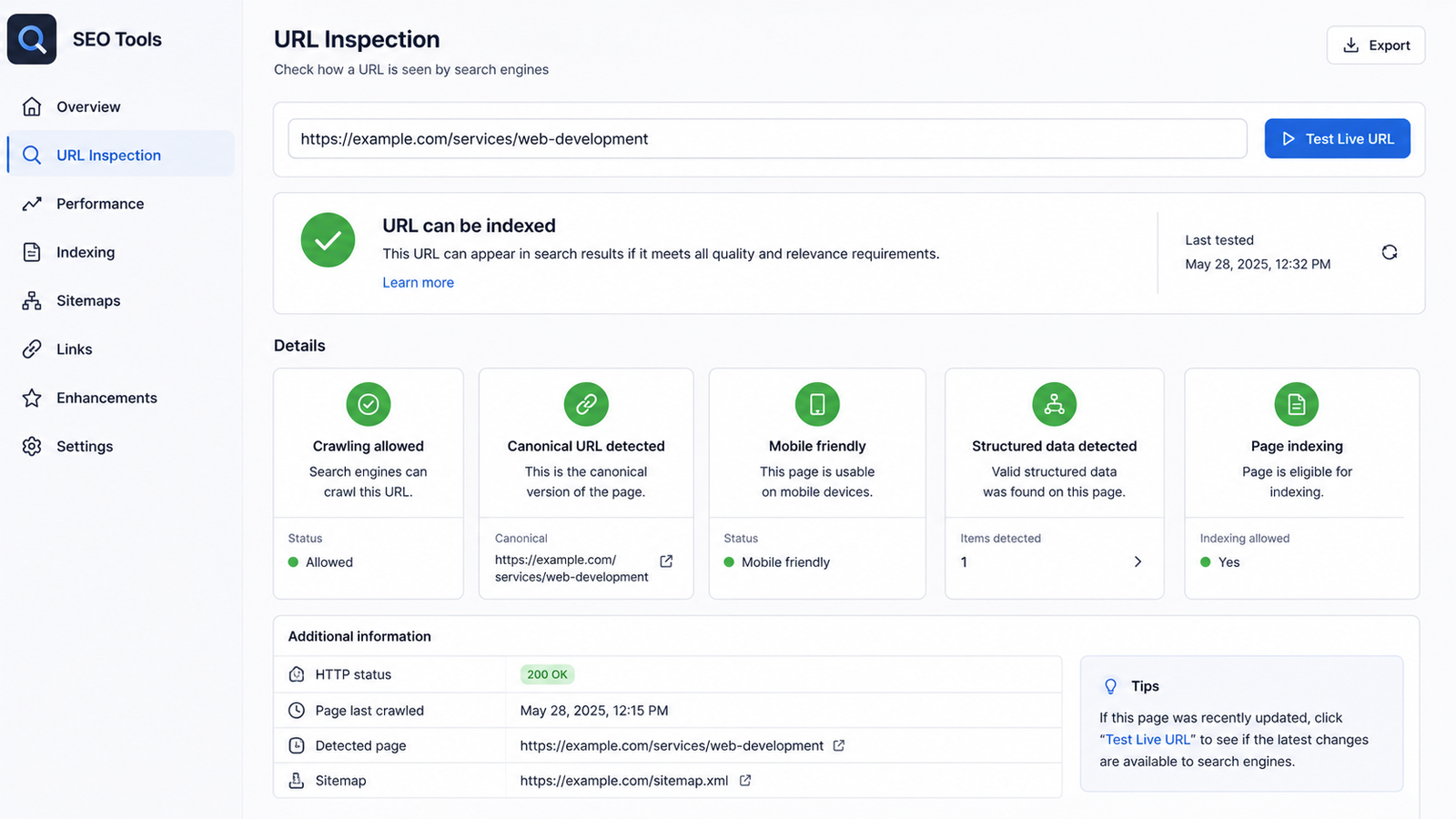
After deploying SEO changes, Search Console can be used to understand how Google sees individual URLs.
For an important URL:
- Open Google Search Console.
- Select the correct property.
- Open URL Inspection.
- Paste the complete URL.
- Review indexing status.
- Run Test Live URL when required.
- Check crawling permission.
- Review the canonical information.
- Review indexing information.
- Request indexing after significant changes when appropriate.
Watch for issues such as:
- Crawled but not indexed
- Discovered but not indexed
- Duplicate page
- Incorrect canonical
- Blocked by
robots.txt - Excluded by
noindex - Redirected page
- Not found
- Soft 404
- Server error
Correct metadata does not automatically mean the page has been indexed.
Step 19: Review Content Quality
Technical SEO is only one part of optimization.
For every important page, ask:
- Is the main topic clear?
- Does the page content match its title?
- Does it answer the visitor's question?
- Is the content unique?
- Is enough useful information provided?
- Are headings meaningful?
- Is important information easy to find?
- Does the content provide actual value?
- Is the writing natural?
- Is the CTA relevant?
For example, a service page should generally explain:
- What the service is
- Who it is for
- What problem it solves
- What features are provided
- How the process works
- Why someone should choose it
- What the visitor should do next
SEO works best when technical configuration and useful content support each other.
Step 20: Create a Final SEO Checklist
After completing the detailed audit, use the same checklist on every important page.
Metadata
- Title exists
- Title is unique
- Description exists
- Description is unique
- Canonical URL is correct
- Robots configuration is correct
Content Structure
- H1 exists
- Heading hierarchy is correct
- Page topic is clear
- Content is useful
- Content is unique
Social Metadata
- Open Graph title exists
- Open Graph description exists
- Open Graph image works
- Open Graph URL is correct
- Twitter/X information is available when needed
Structured Data
- Correct schema is used
- JSON-LD is valid
- URLs are correct
- Images work
- Schema matches visible content
Images
- Informative images have alt text
- Decorative images are handled correctly
- Images are optimized
- Large images are compressed
- Dimensions are provided where appropriate
Technical
- Page returns
200 - URL structure is correct
- Internal links work
- Broken links are absent
- Redirect chains are avoided
- Mobile layout works
- Performance is acceptable
- Sitemap entry is correct
- Indexing is allowed where appropriate
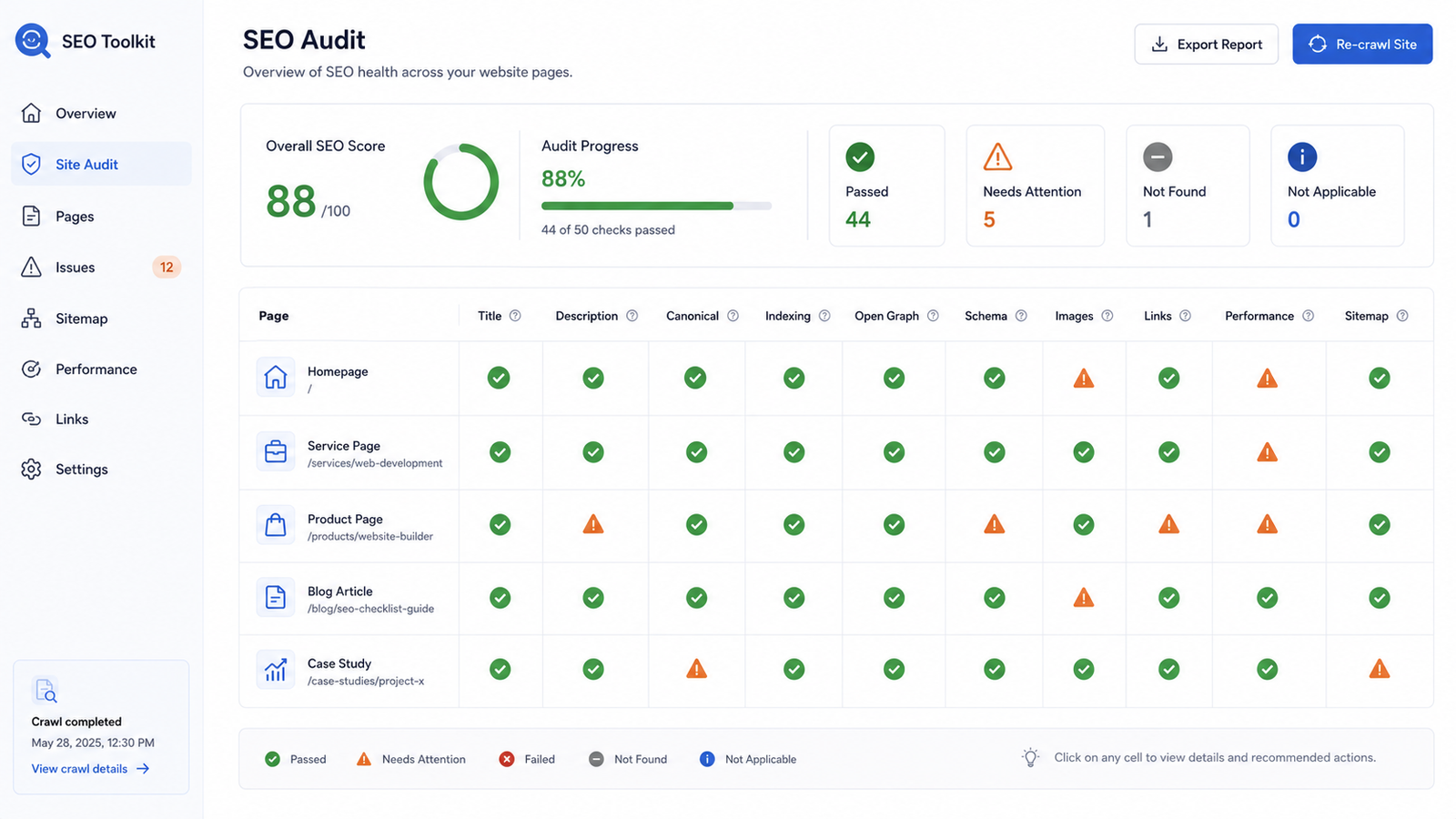
How to Record SEO Problems
For every problem found during testing, record useful information such as:
| FieldExample | |
| Page URL | /services/web-development |
| Problem | Missing meta description |
| Priority | High |
| Required Fix | Add page-specific description |
| Status | In Progress |
| Retest | Pending |
This is especially useful when multiple developers or content editors are involved.
How to Prioritize SEO Problems
Not every issue has the same impact.
High Priority
Examples:
- Accidental
noindex - Incorrect canonical
- Broken page
- Missing title
- Server error
- Invalid redirect
These can directly affect crawling and indexing.
Medium Priority
Examples:
- Duplicate descriptions
- Missing Open Graph image
- Poor heading structure
- Large hero images
- Missing image alt text
Low Priority
Examples:
- Minor wording improvements
- Non-critical schema warnings
- Small metadata refinements
Fix critical crawling and indexing problems before spending time on minor refinements.
Common Challenge: Dynamic SEO Metadata
Static pages can use predefined SEO information.
Dynamic pages are more complicated because their content comes from a database.
Examples include:
- Blog posts
- Products
- Services
- Portfolios
- Case studies
Each page should ideally generate its own:
Title

Description

Canonical URL

Social Image

Structured Data

Page Type
A dynamic SEO system might follow this flow:
Database Content
      ↓
Page Template
      ↓
SEO Metadata Generator
      ↓
HTML Response
      ↓
Search Engine / Social Platform
Common Challenge: Missing SEO Information
A dynamic record may not always contain every SEO field.
For example, a blog article might contain a title, excerpt, and body but no dedicated SEO description.
Instead of leaving the description empty, use fallbacks:
SEO Description
      ↓
Excerpt
      ↓
Cleaned Main Content
      ↓
Default Website Description
The same strategy can be applied to social sharing images.
Common Challenge: Development URLs in Production
Always check that production metadata does not contain URLs such as:
http://localhost:8000

http://127.0.0.1

https://staging.example.com
Check these areas carefully:
- Canonical URL
- Open Graph URL
- Open Graph image
- Schema markup
- Sitemap
All should use the correct production domain.
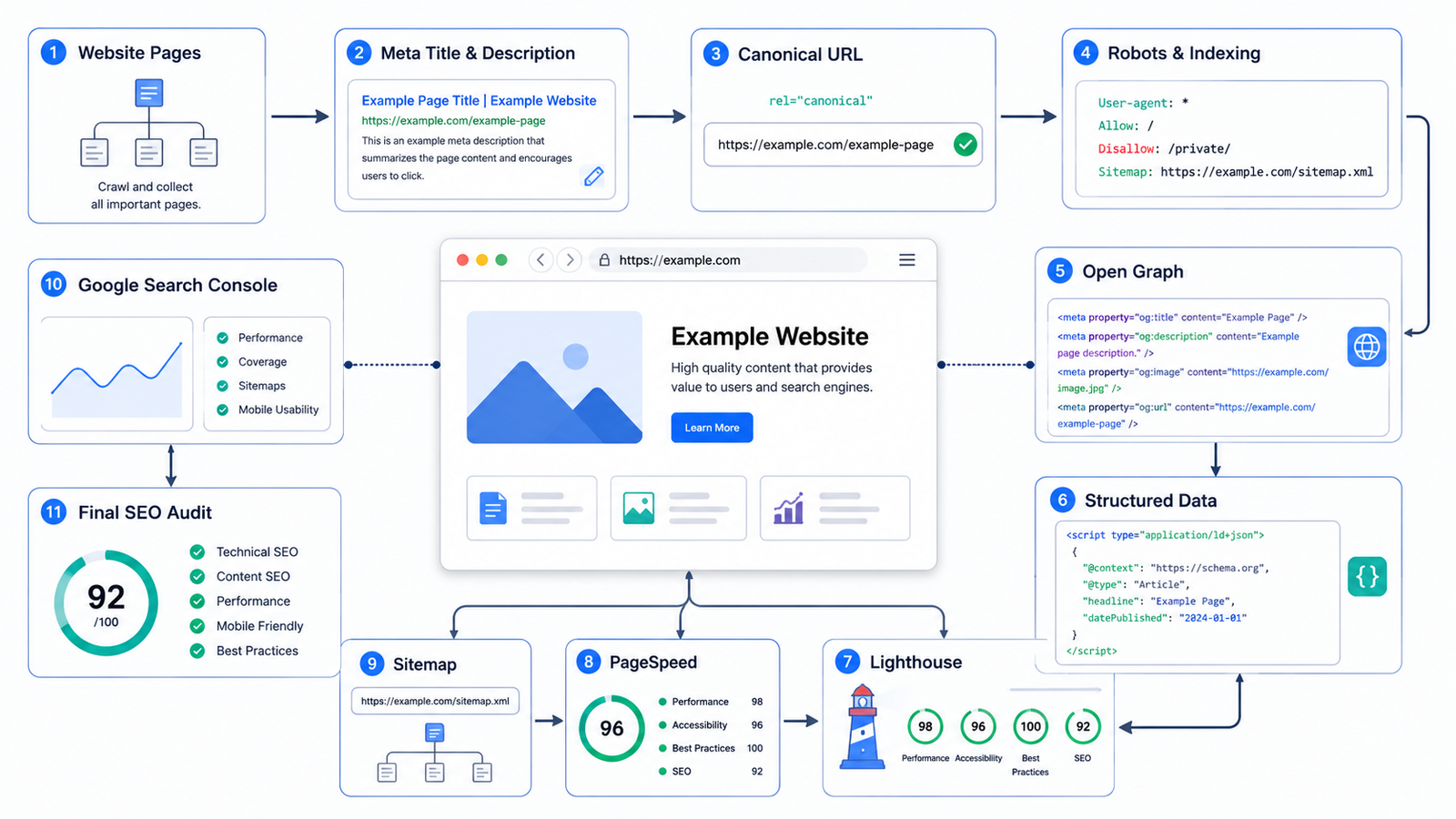
A Practical SEO Testing Workflow
A repeatable workflow can look like this:
1. Build page inventory
        ↓
2. Check title and description
        ↓
3. Inspect heading structure
        ↓
4. Verify canonical URLs
        ↓
5. Check indexing rules
        ↓
6. Test social metadata
        ↓
7. Validate structured data
        ↓
8. Review image SEO
        ↓
9. Check URLs and internal links
        ↓
10. Test responsive layout
        ↓
11. Run Lighthouse
        ↓
12. Test Core Web Vitals
        ↓
13. Compare source and rendered HTML
        ↓
14. Verify HTTP responses
        ↓
15. Check sitemap
        ↓
16. Inspect URLs in Search Console
        ↓
17. Review content
        ↓
18. Record problems
        ↓
19. Fix issues
        ↓
20. Retest
Following a consistent sequence makes large SEO audits much easier to manage.
Key Takeaways
A website is not SEO-ready simply because several <meta> tags have been added.
Proper SEO requires several systems to work together:
- Backend data
- Frontend templates
- Semantic HTML
- Content
- Image optimization
- Performance
- Server configuration
- Sitemap generation
- Structured data
- Search engine tools
Even a very small mistake can create an important SEO problem.
For example:
<meta name="robots" content="noindex">
accidentally remaining on an important production page can prevent that page from being indexed.
An incorrect canonical can similarly tell a search engine to prefer a completely different URL.
Conclusion
Proper SEO testing requires more than checking whether metadata exists.
Every important page should be reviewed to confirm that its SEO information is:
- Accurate
- Unique
- Relevant
- Accessible
- Technically valid
- Consistent with the visible content
Manual inspection should be combined with tools such as:
- Browser Developer Tools
- Lighthouse
- PageSpeed Insights
- Structured Data Validators
- XML Sitemap Inspection
- Google Search Console
The goal is not simply to achieve a high SEO score.
The real goal is to make every public page understandable to users, search engines, and social platforms, while ensuring the website remains technically accessible, properly structured, fast, and useful.
Frequently asked questions
What SEO meta information should I test on every website page?
Check the page title, meta description, canonical URL, robots directives, Open Graph tags, Twitter/X metadata, structured data, HTTP status code, and whether the page appears correctly in the XML sitemap.
How can I check if every page has a unique title and meta description?
Crawl the website using an SEO auditing tool or a custom script and compare the title and meta description of every URL. Look for missing, duplicated, or unusually short or long metadata.
Why is a canonical URL important for SEO?
A canonical URL tells search engines which version of a page should be treated as the primary URL. It helps prevent duplicate-content issues and consolidates ranking signals to the preferred page.
How do I check if a page is accidentally set to noindex?
Inspect the page's <meta name="robots"> tag and the X-Robots-Tag HTTP header. Important public pages should normally allow indexing unless they are intentionally excluded from search engines.
Should every dynamic page have unique SEO metadata?
Yes. Important dynamic pages such as products, services, articles, categories, and case studies should generate metadata based on their individual content instead of sharing the same title and description.
What should I check in an XML sitemap during an SEO audit?
Make sure the sitemap contains only valid, canonical, indexable URLs that return a successful HTTP response. Redirected, duplicate, noindex, or broken URLs should generally not be included.
Why should I compare page source with rendered HTML when testing SEO?
Some websites generate or modify metadata with JavaScript. Comparing the original source with the rendered HTML helps confirm that search engines can access the intended title, description, canonical URL, and other SEO information.
Can a website have a high Lighthouse SEO score and still have SEO problems?
Yes. Lighthouse checks several important SEO fundamentals, but it does not detect every issue, such as duplicate metadata across many pages, incorrect canonical strategies, sitemap problems, duplicate URLs, or site-wide indexing issues.

Experienced full stack developer with expertise in modern web technologies. Passionate about creating efficient and scalable applications.