





A frontend feature often sounds simple when it first appears in a task:
Add a button. Build a table. Create a dropdown. Open a modal. Show a notification.
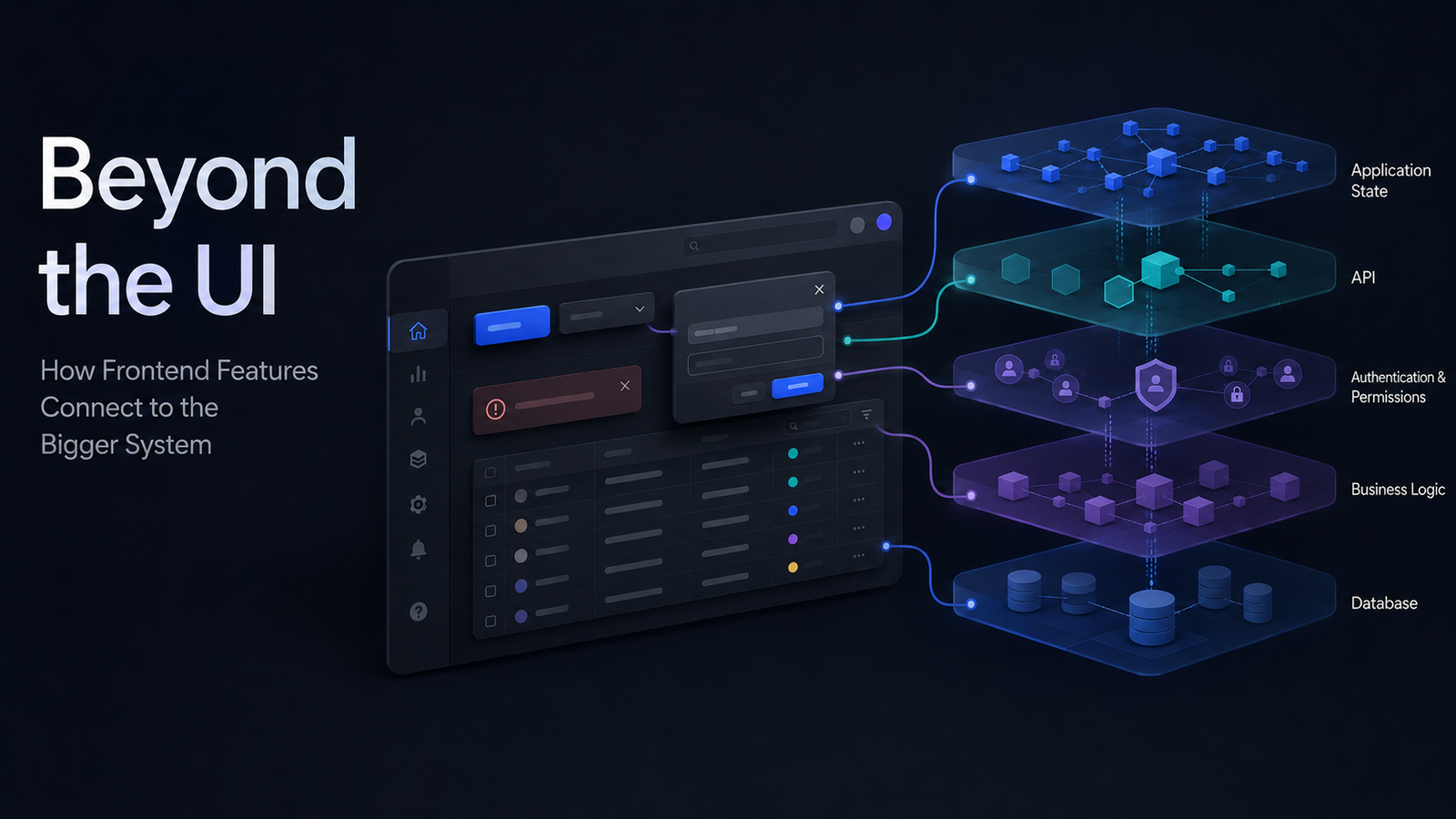
But in a production application, the visible component is usually only the final layer of a much larger workflow.
A button can trigger an API request. A table can depend on filtering, permissions, and pagination. A dropdown can control what data another field is allowed to load. A modal can modify information that is displayed elsewhere on the page.
So instead of asking only:
How do I build this component?
it is often more useful to ask:
What does this component communicate with, what state does it change, and what else depends on the result?
These questions apply regardless of whether the application uses Angular, React, Vue, or another frontend technology.
A Button Can Trigger an Entire Workflow
Consider an Approve button.
Visually, it is one small UI element.
But clicking it may involve:
User Action → Frontend State → API → Authorization → Business Rules → Database → Response → UI Update
The frontend may need to:
- determine whether the button should be visible
- prevent duplicate clicks while processing
- ask the user for confirmation
- send the correct request
- handle errors
- update the affected interface
The backend may need to:
- authenticate the user
- verify permission
- validate the current state of the record
- perform the update
- trigger another process
That means the button itself is not the feature.
The complete workflow is the feature.
Visual 1 — How a Frontend Action Travels Through the System
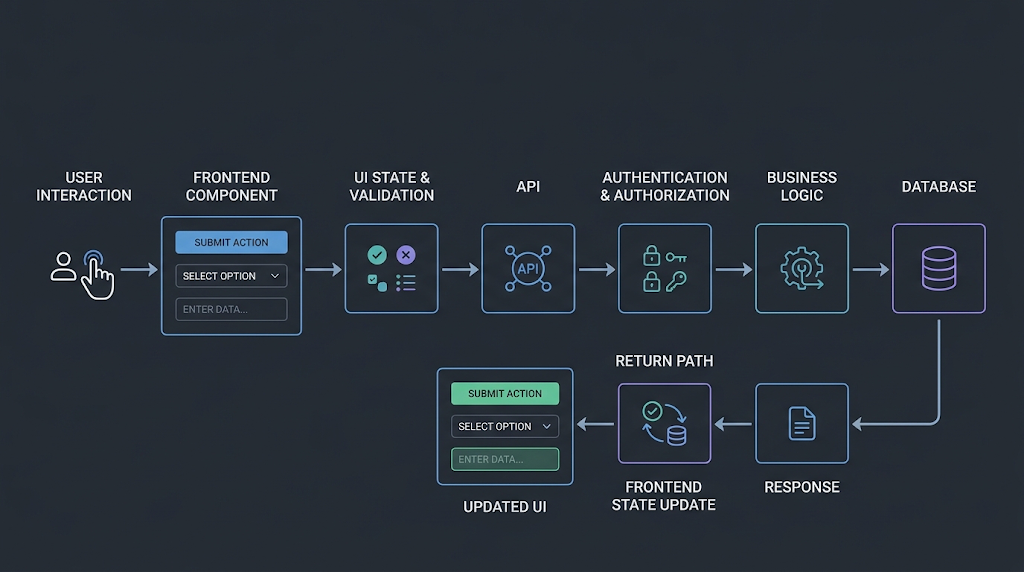
The reader should immediately be able to see:
User → Frontend Component → State / Validation → API → Permissions → Business Logic → Database
and then:
Response → State Update → UI
This gives us the architectural foundation for the rest of the article.
A Table Is the Final View of a Data Pipeline
A table looks like rows and columns.
Behind it, there may be:
Search → Filters → Sort → Pagination → API → Query → Permissions → Response
Imagine an orders table where a user searches for a customer, selects a status, sorts by newest, and goes to page two.
The frontend might send something conceptually like:
search: Rahim
status: pending
sort: created_at
direction: desc
page: 2
The backend then interprets those parameters, applies the relevant access rules, queries the data, and returns the correct result.
This leads to an important debugging lesson:
A problem visible inside a component does not necessarily originate inside that component.
If a table displays the wrong records, the problem might be in frontend state, request parameters, API logic, database filtering, or permission scopes.
Following the data flow is usually more useful than looking only at the place where the bug became visible.
Dropdowns Reveal Data Dependencies
Consider two dropdowns:
Department
and
Employee
The available employees depend on the selected department.
So changing the department may need to:
- clear the previous employee
- enter a loading state
- request the relevant employees
- update the available options
- handle the case where no employees are available
What looked like two independent UI controls is actually a dependency:
Department → Employee Data → Employee Dropdown
This becomes even more important when applications contain several related filters or nested selections.
Understanding the dependency before implementation keeps the component logic much easier to manage.
Modals Reveal State-Synchronization Problems
Now imagine a table containing users.
Clicking Edit opens a modal.
The application now has two views of the same information:
Table Row
and
Edit Modal
The user changes the role and saves it.
The API succeeds.
But what happens to the table?
If the modal closes while the table continues displaying the old role, the backend is correct but the frontend still feels broken.
The application needs a strategy such as:
Save → API Success → Update State → Table Re-renders
or:
Save → API Success → Reload Relevant Data
The exact implementation can differ.
The architectural question remains the same:
Where is the source of truth, and how do all views stay synchronized with it?
A surprising number of frontend bugs are really state-synchronization problems.
Validation, Permissions, and the UI Have Different Jobs
Suppose a form requires a valid email address.
The frontend should validate it immediately so the user receives useful feedback.
But the backend must validate it as well because the API cannot assume every request came through the intended interface.
The responsibilities are different:
Frontend validation → improve the user experience
Backend validation → protect data and business rules
Permissions follow the same principle.
Hiding a Delete button from an unauthorized user improves the UI.
It does not secure the operation.
The backend must still reject an unauthorized request.
A useful rule is:
The frontend controls the experience. The backend controls the authority.
Alerts Should Reflect What Actually Happened
Even a small success message is connected to the larger workflow.
Consider:
“Changes saved successfully.”
That message should not appear merely because the user clicked Save.
It should appear after the operation actually succeeds:
Action → Request → Processing → Success → State Update → Feedback
The same principle applies to failures.
Instead of exposing a technical server error, the frontend should translate the result into useful feedback for the user.
This is where frontend engineering and product experience meet.
Every Component Has More Than One State
Developers naturally focus on the successful state:
Data loaded. Table displayed. Done.
But a data-driven component commonly has several states:
- Initial
- Loading
- Success
- Empty
- Error
And sometimes:
- Retry
- Disabled
- Unauthorized
For example, a table should not become an unexplained blank area when no records exist.
An empty state should tell the user what happened.
Similarly, a skeleton can communicate an upcoming page structure better than an indefinite spinner.
Visual 2 — The Lifecycle of a Data-Driven Component
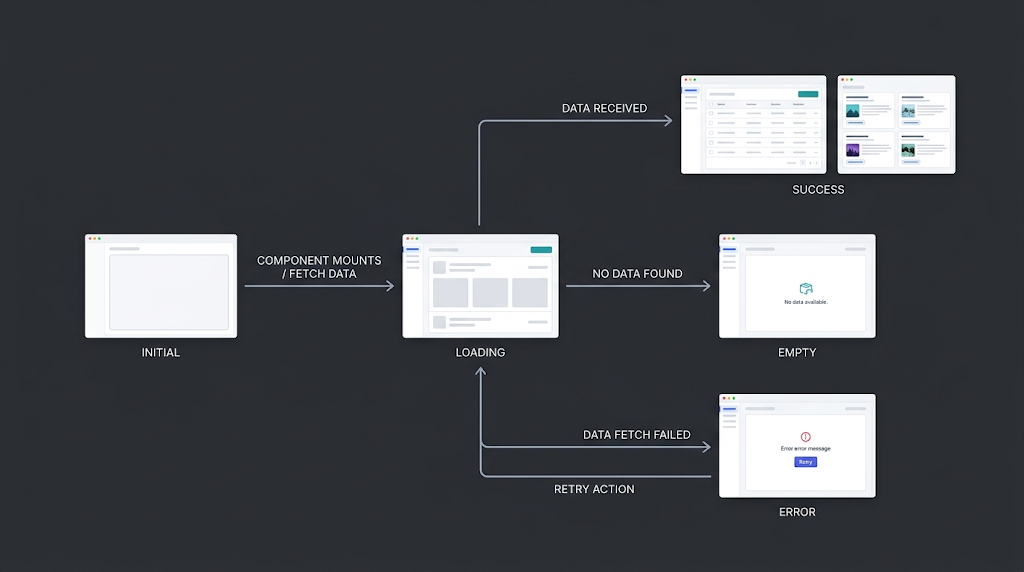
Show:
Initial → Loading → Success
with branches from Loading to:
Empty
and
Error → Retry → Loading
This diagram helps demonstrate that designing a component means designing its entire lifecycle, not only its successful state.
A Practical Checklist
Before building a frontend feature, ask:
Data
Where does the information come from?
State
Who owns the current state?
Dependencies
Does changing this component affect another one?
API
What request or response is involved?
Validation
What feedback should happen immediately?
Permissions
What may the user see, and what may they actually do?
Lifecycle
What happens during loading, success, empty, and failure?
Synchronization
What else needs to update when the data changes?
These questions can reveal architectural problems before they turn into complicated code.
The Bigger Picture
Buttons, tables, forms, dropdowns, modals, alerts, and navigation elements are what users see.
Behind them are:
State → APIs → Permissions → Validation → Business Rules → Data → Backend Workflows
Frontend developers do not need to own all of those layers.
But understanding how those layers connect makes it much easier to build interfaces that remain predictable as an application grows.
So when the next task says:
“Just add a button.”
look one level deeper.
Ask what the action changes, who is allowed to perform it, where the data goes, what happens if it fails, and what else depends on the result.
The component may be small.
Its place in the system usually isn't.
— Rahat Chowdhury
Frequently asked questions
Should frontend components contain business logic?
Usually, no. Frontend components should mainly handle presentation, interaction, and local UI state. Core business rules should generally remain in the backend so they can be enforced consistently.
Is frontend validation enough?
No. Frontend validation improves the user experience, but backend validation is still required because API requests can be made without using the frontend.
Where should permissions be checked?
Both frontend and backend have a role. The frontend can hide or disable unavailable actions, while the backend must enforce whether the action is actually allowed.
When should frontend data be refreshed after an update?
It depends on how state is managed. You can update the existing frontend state directly or fetch the affected data again. The important part is keeping every view synchronized with the backend.
Why should loading, empty, and error states be designed separately?
Because they represent different user situations. A loading state explains that data is still coming, an empty state explains that no data exists, and an error state tells the user something went wrong and what they can do next.
Does this approach depend on Angular, React, or Vue?
No. The examples are framework-agnostic. The same principles around state, APIs, permissions, validation, dependencies, and synchronization apply across modern frontend frameworks.
What is the most useful question to ask before building a frontend feature?
Ask: “What else does this feature depend on, and what else will change when it runs?” That question usually reveals the API, state, permission, validation, and synchronization requirements behind the visible UI.

Creative full stack web developer with strong problem-solving skills and expertise in modern web development technologies.